Akuvox Cloud || How to Check/ Export Captured Images

Akuvox Cloud || How to Check/ Export Captured Images

7.3. Check/Export Captured Images

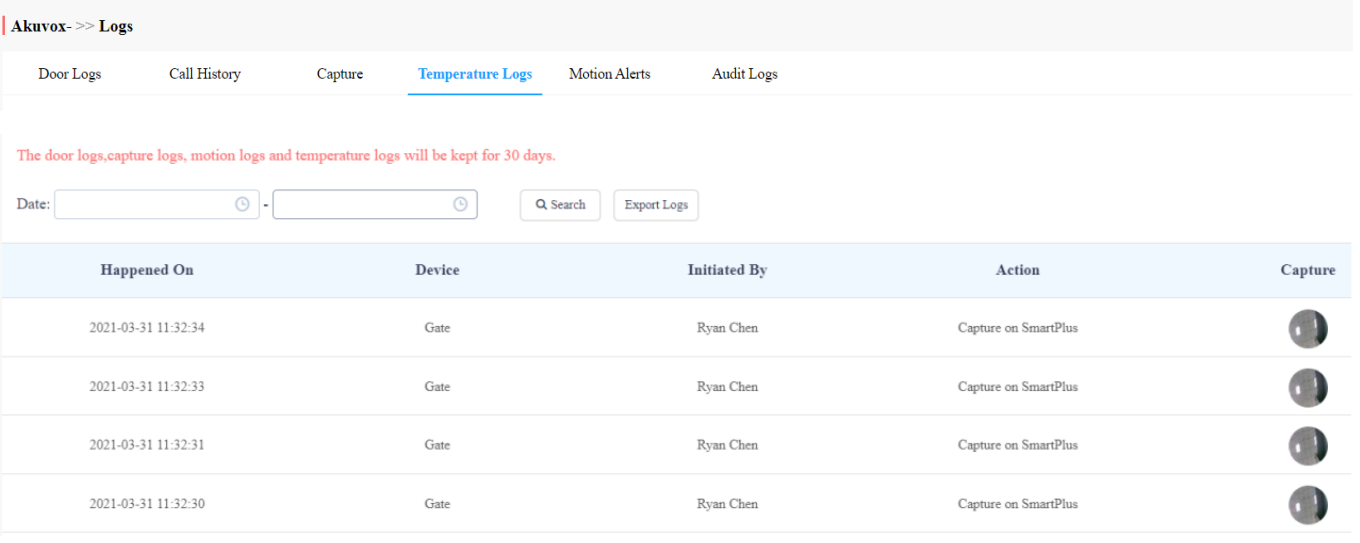
Images capturing are either initiated manually by residents or the property management staff. You can check when, where, how and by whom the images are captured.

  1. Click on Capture.
  2. Set the time range if needed.
  3. Click on Search.
  4. Click Capture to see the enlarged image.
  5. Click on Export Logs to export logs.

  • Parameter Set-up:

No.

Column Name

Description

1

Happened On

Shows when the images are captured.

2

Device

Show you the door phone from which the images are captured.

3

Initiated By

Shows who have initiated the image capturing.

4

Action

Shows how the image capturing is initiated, the capturing can be initiated from SmartPlus, the indoor monitor, etc.

5

Capture

You click on the image to see a larger picture.

    • Related Articles

    • Akuvox General || How to Check/Export Captured Images

      How to Check/Export Captured Images Images capturing are either initiated manually by residents or the property management staff. You can check when, where, how and by whom the images are captured. Click on Capture. Set the time range if needed. ...
    • Akuvox Cloud || How to Check/ Export Access Logs

      7.1. Check/Export Door Logs Door logs are divided into two types, namely Call type and Door release type. The Call type log shows the SIP/IP-based calls initiated on the door phone, indicating when, where and to whom the calls are made, while the ...
    • Akuvox General || How to check/export door access logs

      How to check/export door access logs Logs Log module contains six sub-modules used for checking the door logs, call history, temperature logs, image captured, temperature logs, motion alerts, and operation logs that can be stored for 30 days. With ...
    • Akuvox Cloud || How to Check Motion Alerts

      7.65 Check Motion Alerts Motion alerts Sub-module allows you to check the captured image of people whose movements have triggered the motion detection in the door phones (door phones with motion detection function). Set the time range. Click on ...
    • Akuvox Local || SDMC: Search/Check/Delete and Export Access Logs

      SDMC: Search/Check/Delete and Export Access Logs Click Logs > Access Logs. Search the access logs by Name, Location, Personnel ID, or Device Name in the search field. Click to see the picture captured. Click to delete the log. Click to export the log ...