Akuvox Cloud || How to Check Motion Alerts
7.65 Check Motion Alerts
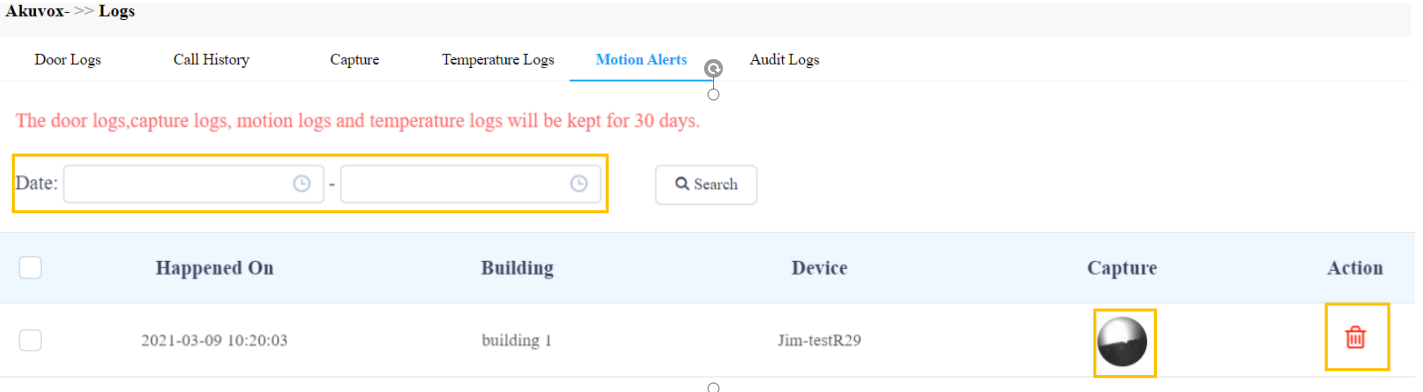
Motion alerts Sub-module allows you to check the captured image of people whose movements have triggered the motion detection in the door phones (door phones with motion detection function).
- Set the time range.
- Click on Search.
- Click on the specific captured image for an enlarged one.
- Select and delete the motion alert if needed.
|
No.
|
Column Name
|
Description
|
|
1
|
Happened On
|
Shows when the image is captured due to the motion detection.
|
|
2
|
Building
|
Shows in which building the image is captured.
|
|
3
|
Device
|
Shows which door phone the image is captured from.
|
|
4
|
Capture
|
Displays the images captured due to motion detection.
|
|
5
|
Capture
|
Clicks on the image for an enlarged one.
|
Related Articles
Akuvox General || How to Check Motion Alerts Log
How to Check Motion Alerts Log Motion alerts sub-module allows you to check the captured images of people whose movements have triggered the motion detection in the door phones (door phones with motion detection function). Set the time range. Click ...
Akuvox Local || SDMC: Search/Check/Delete/Export Motion Detection Records
SDMC: Search/Check/Delete/Export Motion Detection Records Click Logs > Motion Detection. Search the motion detection log by date, name, or location in the search field. In Operation field, you can click the picture to see the enlarged one and to ...
Akuvox Cloud || How To Setup Motion Detection Settings for Door Phones
How To Setup Motion Detection Settings for Door Phones on Akuvox Cloud You can not only enable and disable motion detection on the door phone but also set up the device motion detection type and alert trigger delay if needed. Click on Motion Setting. ...
Akuvox General || New Cloud Update for Office Projects
Akuvox General || New Cloud Update for Office Projects ~ October 14th, 2024 ~ The Akuvox Cloud Account Service received an upgrade. The Office Project layout has been optimized with many changes for the Installer Account Web Portal. ...
Akuvox General || How to check/export door access logs
How to check/export door access logs Logs Log module contains six sub-modules used for checking the door logs, call history, temperature logs, image captured, temperature logs, motion alerts, and operation logs that can be stored for 30 days. With ...