UNV General || EZCloud Chrome Plug-in Fix

UNV General || EZCloud Chrome Plug-in Fix

Issue with EZCloud where videos won't display even after installing the Chrome plug-in fix.

To fix it,

1. Open this site:

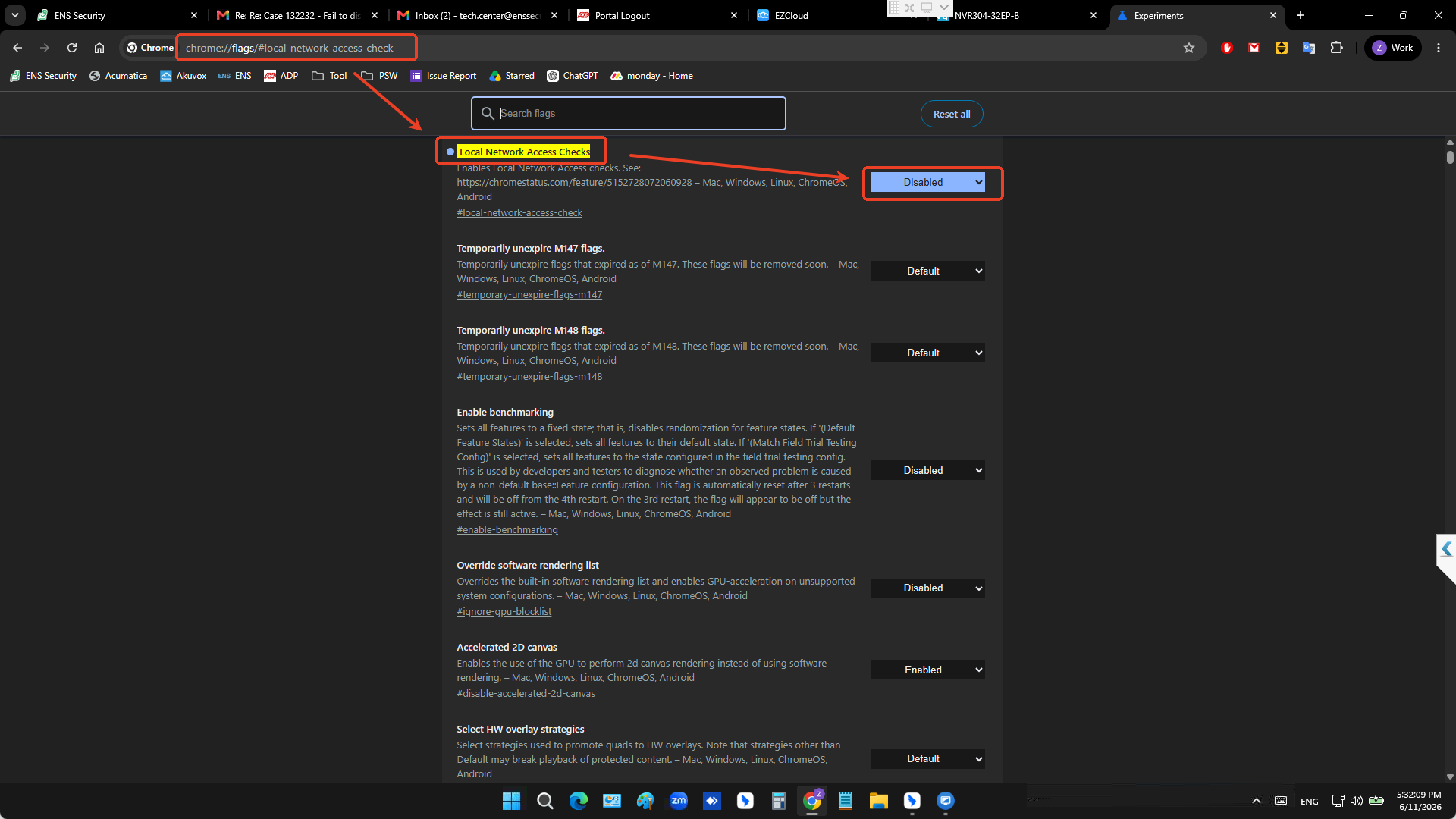
chrome://flags/#local-network-access-check

2. Set the Local Network Access Checks to Disabled

3. completely close the browser, then reopen it and try again. (Relaunch)

    • Related Articles

    • General || Plug and Play in CCTV ||

      1.2 Plug and Play in CCTV A beginner's guide to security camera systems that set themselves up In a nutshell Plug and play means you connect a camera and it just works - no manual settings. In CCTV this almost always refers to a recorder (NVR) with ...
    • Emerald General || Emerald Plug n Play Interaction

      Emerald IPC and UNV NVR Emerald IPC support “Plug and Play” with UNV NVR, the default protocol is ONVIF, basic video functions will be no problem, only intelligent functions are affected. If a customer needs to use intelligent functions, then they ...
    • UNV General || UNV Password reset using a MAC

      UNV Password reset - MAC Use this guide if you need help getting the device serial number using a MAC. If you already have the Serial number, please give it to the ENS Technician along with the current date of the camera. First download EZ Station ...
    • UNV Recorder || How to Set Up EZCloud || Web GUI

      To access the web client, please use a Windows based PC and use Internet Explorer as the web browser. Access the recorder’s web interface by typing in the IP address on the address bar of Internet Explorer. The path should look like the following: ...
    • UNV Recorder || How to Set Up EZCloud || Local GUI

      Log into the system by entering the username and password. Default credentials are admin for the username and 123456 for the password. After logging in, move the mouse to the lower left hand corner of the screen and select the home icon. You may ...