Akuvox Local || How to Configure Web Relay On Akuvox Door Phones
Scenario
Web Relay is a network-based relay that is connected to the door lock for access control. As it is network-based, web relay gives you greater security for access control. This article teaches you how to configure web relay and web relay commands on the door phone web interface to achieve access control using web relay.
Operation Instruction
This article is applicable to all models of Akuvox door phones.
## Operation Procedure
- On the web interface, navigate to:
a.Access Phone > Web Relay > Web Relay.
b.Access Control > Web Relay > Web Relay ( for X915)
c.Access Phone > Web Relay > Web Rleay( for X916).
2.Click the Type field to configure the relay control type.
a.Select "Web Relay" if you want to unlock the door by triggering the web relay. ( The local relay will not be triggered)
b.Select" Both" if you want the door to be unlocked by a local relay or by web relay. ( local relay has priority over the web relay in triggering for door unlock).
c.Select" Disable" if you want to disable the web relay function.
- Enter the IP address of the web relay.
Leave the field blank, if you want to control more than one web relay using the HTTP Get method with a complete HTTP command, which contains a web relay IP address.
- Fill in the web relay username and password provided by the web relay manufacturer for the authentication.
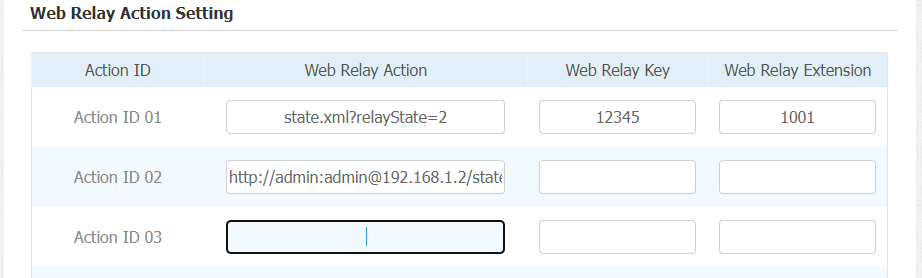
5. Configure the Web relay Action
a.If you do not fill in IP address in the IP Address Field above, fill in a complete HTTP command. eg Http://admin:admin@192.168.1.2/state.xml?relayState=2. ( HTTP://:@IP address>/state.xml?relayState=2)
b.If you have already filled in the IP address above, fill in the omitted HTTP command, eg. state.xml?relayState=2.
The HTTP command will be sent to the web relay to carry out a specific action, for example, door opening.
- Configure Web relay Key.
a.Leave the field blank if you want the door to be unlocked by all other types of access authentication methods(not inclusive of Temporary PIN code).
b.Fill in the DTMF code in the field if you want the door to be unlocked via the DTMF code during the call.
Currently, you cannot unlock the door via web relay on the homepage and monitor page of your SmartPlus app.
When the DTMF code is entered, the web relay can only be triggered by DTMF code and RF cards.
- Configure Web relay extension.
a.Fill in the extension number of the device, eg the SIP or IP number of an IP phone. When the number is filled in, only the device with the number is allowed to trigger the web relay via DTMF code during the call.
b.Leave the field blank if you want all the devices to be able to trigger the web relay via DTMF code during the call.
Then DTMF code between the door phone and the other device should be identical for the web relay control.
You are allowed to fill in 50 web relay actions maximum.
Related Articles
Akuvox Cloud || How to configure Web Relay to operate door phones from Indoor Monitors
Tips: IT83X,C317 has NO/NC/COM three terminals which supports to connect locks by itself. Users can press the Unlock key during the call. . 1. Local Relay Go to Phone - Relay to setup the DTMF code of local relay in website. Relay Type: There are two ...Akuvox Local || How to Configure Web Relay on the Indoor Monitor
Scenario When you can connect the web relay to the indoor monitor if you can control door unlock on the indoor monitor directly. This article helps you walk through the process for the web relay configuration on the indoor monitor Operation ...Akuvox Local || How to Register 3rd party SIP Account on Akuvox Door Phones
How to Register 3rd party SIP Account on Akuvox Door Phones NOTE: SIP-based Akuvox intercom devices can integrate many third-party SIP server brands. Usually, we register a SIP server to implement SIP calls among multiple devices in different ...Akuvox General || How to check for “Input Trigger” logs on Door Phones
Akuvox door phones contact Door Locks which will help you determine what method was used to trigger the relay resulting in gaining access to a property. Input Logs are only available in the devices Web User Interface. To access these logs, you will ...Akuvox Local || How to Configure HTTP Door Unlock
How to Configure HTTP Door Unlock The EC33 Elevator Controller supports remote door unlocking via an HTTP command. Simply enable this feature and input the HTTP command (URL) for the door phone. This will trigger the relay and open the door, even if ...